Posts

Showing posts from September, 2017

requestFileSystem() vs resolveLocalFileSystemURL()

. When you get file system access using requestFileSystem , access is granted for the sandboxed file system only (the sandbox limits access to the app itself), not for general access to any file system location on the device. (read here for TEMPORARY and here for PERSISTENT storage tutorial) To access file system locations outside the sandboxed storage, use other methods such as window. requestLocalFileSystemURL , which support platform-specific locations.  As of Cordova v1.2.0 (cordova-plugin-file), URLs to important file-system directories are provided. Each URL is in the form file:///path/to/spot/, and can be converted to a DirectoryEntry using window. resolveLocalFileSystemURL (). ( read here ) . Methods requestFileSystem() Requests a file system where data should be stored. You access a sandboxed file system by requesting a  LocalFileSystem  object using this global method,  window.requestFileSystem() . void requestFileSystem( in unsigned shor...

Ionic 1 Cordova Files (persistent)

Image
Objective 1. To use window.requestFileSystem 2. To use window.PERSISTENT type of storage 3. To implement file create, read, write and delete. References 1.  https://cordova.apache.org/docs/en/latest/reference/cordova-plugin-file/index.html 2.  https://www.html5rocks.com/en/tutorials/file/filesystem/ 3. Codes samples adapted from:  https://www.tutorialspoint.com/cordova/cordova_file_system.htm 0. Add Cordova cordova plugin add cordova-plugin-file 1. HTML View <button ng-click="cdv('create-file')" class="button button-positive button-block">create-file</button> <button ng-click="cdv('write-file')" class="button button-positive button-block">write-file</button> <button ng-click="cdv('read-file')" class="button button-positive button-block">read-file</button> <button ng-click="cdv('remove-file')" class="button button-po...

Ionic 1 Cordova Files (temporary)

Image
Objective 1. To use window.requestFileSystem 2. To use window.TEMPORARY type of storage 3. To implement file create, read, write and delete. References 1.  https://cordova.apache.org/docs/en/latest/reference/cordova-plugin-file/index.html 2.  https://www.html5rocks.com/en/tutorials/file/filesystem/ 3. Codes samples adapted from:  https://www.tutorialspoint.com/cordova/cordova_file_system.htm 0. Add Cordova cordova plugin add cordova-plugin-file 1. HTML View <button ng-click="cdv('create-file')" class="button button-positive button-block">create-file</button> <button ng-click="cdv('write-file')" class="button button-positive button-block">write-file</button> <button ng-click="cdv('read-file')" class="button button-positive button-block">read-file</button> <button ng-click="cdv('remove-file')" class="button button...

Ionic 1 Cordova Camera

Image
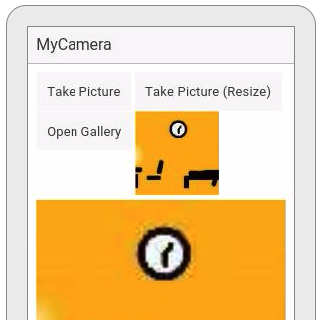
0. Add Cordova cordova plugin add cordova-plugin-camera 1. HTML <button class = "button" ng-click = "takePicture()"> Take Picture</button> <button class = "button" ng-click = "takePictureResize()"> Take Picture (Resize)</button> <button class = "button" ng-click = "openPicture()"> Open Gallery</button> <img ng-src = "{{mediafile}}"> 2.JS function($scope, $stateParams) {     $scope.mediafile = '';     var options = {};     /*options     quality: 50,     destinationType: 1,      //0=DATA_URL, 1=FILE_URI, 2=NATIVE_URI     //https://cordova.apache.org/docs/en/latest/reference/cordova-plugin-camera/index.html#cameradestinationtype--enum     sourceType: 1,     //0=PHOTOLIBRARY, 1=CAMERA 2=SAVEDPHOTOALBUM     //https://cordova.apache.org/docs/en/latest/reference/cordova-plugin-camera/index.html#camerapicturesourcetype--enum ...

Ionic 1 Call Cordova Plug Ins

1. HTML <button class = "button" ng-click = "callCordova()"> Call Cordova Plug In</button> 2.JS function($scope, $stateParams) {     var cdv = function(options) {         console.log('begin cdv');         document.addEventListener("deviceready", function() {             console.log('deviceReady');             /*cordova task begin*/             /*cordova task end*/         }); /*device ready*/     } /*cdv*/ }/*controller*/

Apps Scripts Upload File To Google Drive

1.Code.gs function doGet(e) {   return HtmlService.createHtmlOutputFromFile('Index'); } function doPost(e) {   if (!e.parameters.filename || !e.parameters.file || !e.parameters.fileformat) {     return message("Error: Bad parameters");   } else {     var mime =e.parameters.fileformat;     if (mime) {       var data = Utilities.base64Decode(e.parameters.file, Utilities.Charset.UTF_8);       var blob = Utilities.newBlob(data, mime, e.parameters.filename);       DriveApp.getFolderById('0B86b-ALn-1MGTEI1MjJ4SWFxSDQ').createFile(blob);       return message("completed");     } else {       return message("Error: Bad image format");     }   } } function message(msg) {   return ContentService.createTextOutput(JSON.stringify({result: msg})).setMimeType(ContentService.MimeType.JSON); } 2.Index.html <!DOCTYPE html...