AngularJS directives to integrate Google Maps into your applications. There are directives for most of the widely-used objects, including markers, windows, lines and shapes. We’re currently working on integrating more layer objects, including the HeatMap and such.
AngularGM is a set of directives for embedding Google Maps in your application using the Javascript API. If you want a handle to the map, you should use the getMapPromise(mapId) method so you can guarantee the map will be initialized.
Making map components with AngularJS pretty awesome demo. The simplest situation is just setting up a map with a starting location. Using the directive link function instantiate the map seems to do a great job.
The talk covers basic Maps API following by the use of AngularJS to create a Maps application. The source code for live ng-map demo can be found under the “demo” directory in the github repository.
6-10 – Please tell us below if you know any more good JavaScript demos of Google maps which we can add to this web page to help others.
Also if you are looking to code or have coded any features we are looking for include functionality for zooming the maps with mouse scrolling or by finger pinch (on mobile devices) we would love to hear about it. We’re also API integration such as real-time search custom markers and other similar geo-location features. In return we can offer you some exposure and usage/adoption to your module for free.
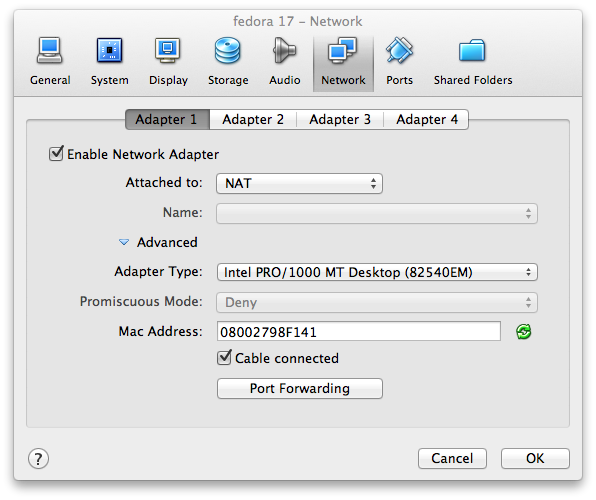
. Networking In VirtualBox The following tutorial was copied from the original URL https://blogs.oracle.com/fatbloke/entry/networking_in_virtualbox1 . The original URL has lost the link to the images. Thus the content (with the missing images) is copied to here for reference purposes. Networking in VirtualBox By Fat Bloke on Jun 08, 2012 Networking in VirtualBox is extremely powerful, but can also be a bit daunting, so here's a quick overview of the different ways you can setup networking in VirtualBox, with a few pointers as to which configurations should be used and when. VirtualBox allows you to configure up to 8 virtual NICs (Network Interface Controllers) for each guest vm (although only 4 are exposed in the GUI) and for each of these NICs you can configure: Which virtualized NIC-type is exposed to the Guest. Examples include: Intel PRO/1000 MT Server (82545EM), AMD PCNet FAST III (Am79C973, the default) or a Paravirtualized net...
. Packet Analysis Using Wireshark - http://itech.fgcu.edu/faculty/zalewski/projects/files/WiresharkReport2011.pdf Packet Capture - http://www.bradreese.com/how-to/wireshark-how-to.pdf TRAFFIC ANALYSIS WITH WIRESHARK - https://www.csirtcv.gva.es/sites/all/files/downloads/cert_trafficwireshark.pdf Wireshark Quick-Start Guide - http://www.eecs.yorku.ca/course_archive/2011-12/F/3213/Project/guide.pdf Wireless Sniffing with Wireshark - http://www.willhackforsushi.com/books/377_eth_2e_06.pdf I N T R O D U C T I O N T O W I R E S H A R K - https://www.dc.uba.ar/materias/tc/2013/1c/descargas/papers/wireshark 100 Wireshark tips - https://www.chappellu.com/files/100WiresharkTips_Chappell.pdf Wireshark User's Guide - http://www.packetlevel.ch/html/tshark/doku/wireshark.pdf Packet Sniffing with Wireshark and Tcpdump - http://science.hamptonu.edu/compsci/docs...



Comments